

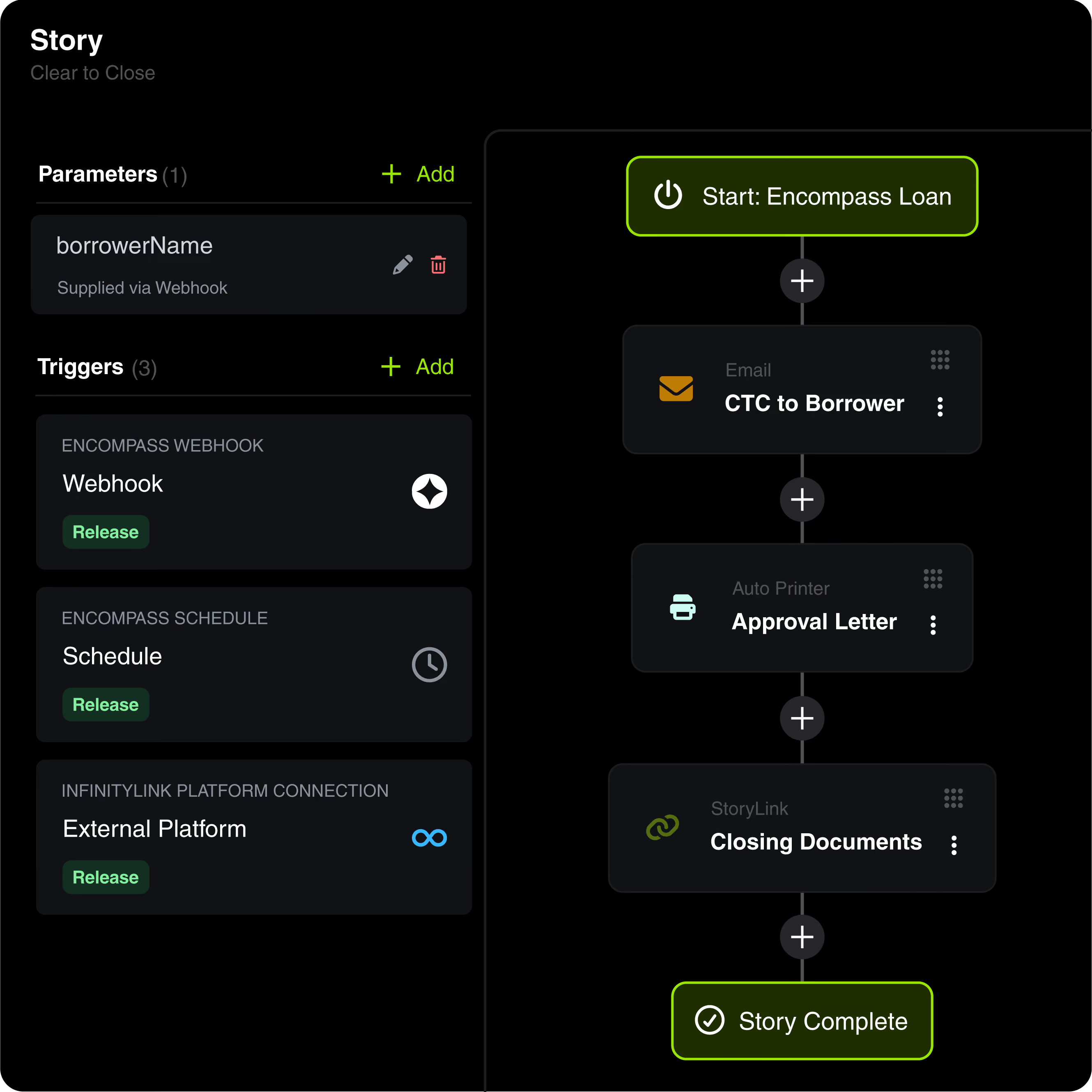
Every Story in Infinity Solutions™ Ascent follows the same grammar: Stories hold the process, Chapters are the steps inside them, and Actions are the pieces you build once and reuse everywhere. All of it in one drag-and-drop canvas.
Stories hold the whole automation in one place: the event that starts it and everything that follows.
Chapters are what happen inside a Story. Read them down the page, and you'll see exactly what happens and when.
Actions are reusable components that you name and reuse - build it one time, then drop it into any Story.
Start with a pre-loaded collection of Stories, Actions, and Packages - ready to deploy on day one.
Build a CTC Email once and drop it into every Story as a Chapter. Set an Auto Printer for the closing package, a Loan Filter for FHA, and send text messages for rate lock expirations.

Build email template and configure
pre-defined recipients

Update one or more loan fields

Automate loan field updates based on conditional data

Output Print Forms to eFolder documents

Build loan criteria and test them against
the Encompass pipeline

Build a text message template and
configure pre-defined recipients

Define the columns of an Encompass loan report.

Send a borrower a link to pay, using a payment request template

Move the loan to the selected folder

Update the current milestones for a given loan

Assign a user to a role on the loan

Run a round robin scenario against the loan

Let others know you need to get into a loan

Design a web page that displays loan data and collects information from a visitor

Connect outside platforms to Ascent

1 · Begin Your Story
Build your own or choose one from our trusted library. Every Story starts on your terms: the moment a loan changes, on a schedule you set, or on a call from any system you use.
2 · Add Chapters and Actions
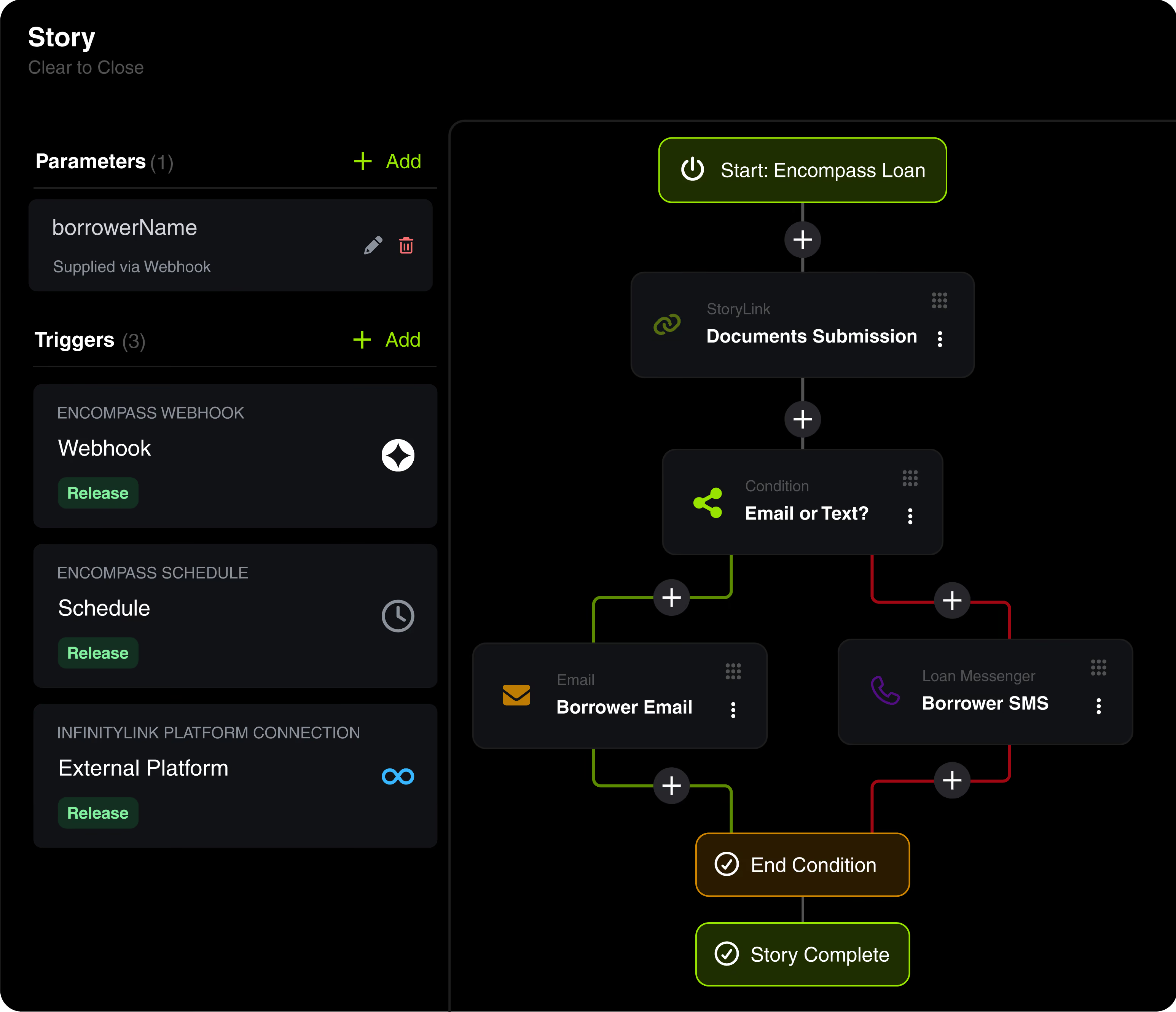
Build your Story one Chapter at a time. Notify a borrower, print a package, move a file, update a field. Set up conditions, and the Story takes the right path on its own.
3 · Launch When Ready
You control when it runs. Publish it to one, some or all of your Test, UAT, Dev, or Production environments as you see fit.
Generate an API key in Ascent, hand it to the system you want to trigger from, and that system can run a Story on demand. No schedule, no loan change, no waiting for an event inside Encompass.
Your intranet, CRM, or internal process sends a request.

The endpoint and API key you configured identify the request.
The Story executes exactly as it would from any other trigger.
StoryLink™ brings the borrower, third parties, and internal users who don't live in your LOS into the loan Story. Spin up customized, branded web pages to send, request, and receive data, decisions, and documents - ECOA decisions, condo approvals, loan committee sign-offs, second signatures, appraisal reviews, one-off doc requests from the borrower - all seamlessly integrated into your workflow.
Branded borrower-facing page that delivers the adverse action decision and collects acknowledgement. Reg-B ready, audit-logged.
Send the condo questionnaire and HOA docs to a reviewer outside your LOS. They approve, deny, or comment in-page.
Committee members review the loan package and vote in a secure page. Decisions flow back into Encompass.
Send the appraisal to an internal reviewer or external QC. They flag, comment, and sign off without an LOS seat.
Need a tax return, VOE, or HOA letter? Send a secure upload page to the borrower - doc lands in the eFolder.
Branded farewell page where the borrower confirms receipt of new servicer details.
The examples above are just the ones we hear about most often. Spin up a branded, secure page for any external send / request / sign / approve flow your operation needs - in just minutes.
On top of the power of Ascent, every tier includes an allowance for additional solutions; pick and choose any from our vast catalog of industry-trusted SDK and Web tools. Keep the SDK plugins your team relies on, get their Web counterparts (and vice versa) at no extra cost, and transition whenever you're ready.

Plugins, tools, utilities, and integrations - all professionally developed, documented, and regression-tested against every ICE release.
Keep the SDK plugins your team relies on and get their Web counterparts at no additional cost. Transition at your own pace.
*Transaction fees may apply.
More than a decade of Encompass specialization, live support, and a written product warranty on every solution.
Search it, sort it, and take your time - your picks are yours to change as your operation does.


(1) Excludes MERS, Round Robin, QC Regulator, Condition Manager, Enhanced Condition Manager, Audit Manager + Snapshot 2.0, Appraisal Assistant, PA Automation, Batch Update Utility, and Batch Update Utility Pro.
(2) Excludes MERS, Round Robin, QC Regulator, Condition Manager, Enhanced Condition Manager, Audit Manager + Snapshot 2.0, Appraisal Assistant, and PA Automation.
(3) Excludes MERS, Round Robin, QC Regulator, Condition Manager, Enhanced Condition Manager, Appraisal Assistant, and PA Automation.
* Monthly Subscription Minimum Fee Applies






.png)